Streamline Marketing and Automation
Nexavia sets Marketing Hub around the campaigns you already run: lists, forms, email, tracking and the reports marketers will open on Monday.
Talk with us about the campaign that is stuck, or about a hub you have licensed and barely used.

Attract. Convert. Delight.
Marketing Hub is the engine for campaigns that land in HubSpot rather than a side spreadsheet. We help you attract, convert and follow up from one record.
Paid tracking, workflows and dashboards are built so you can see which campaigns to keep and which to stop, without exporting the story to another tool.
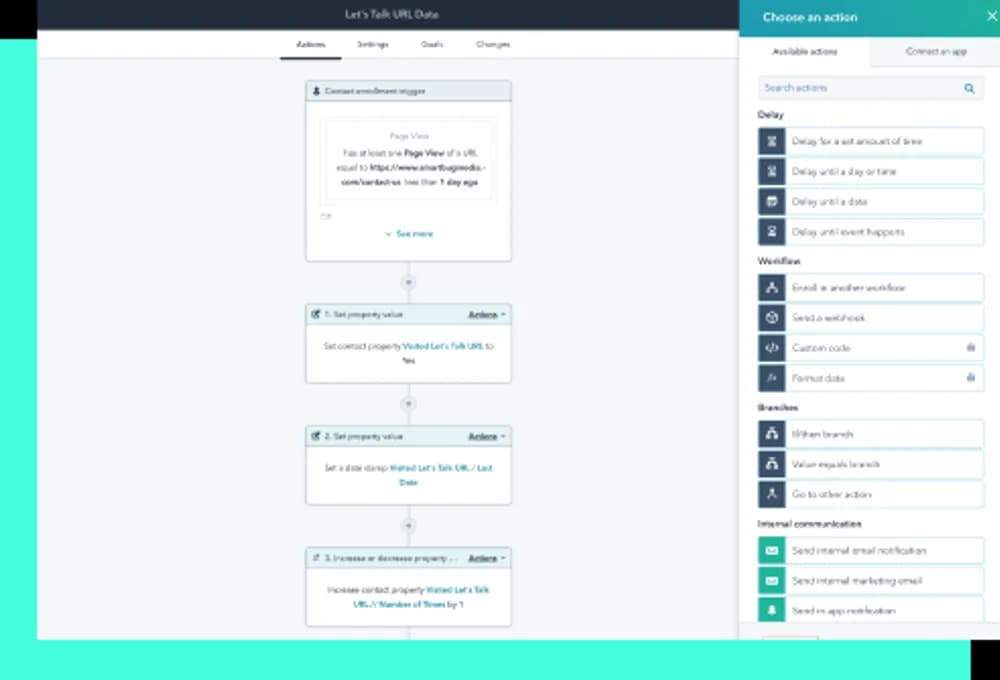
Maximize the impact of your CRM.
We plan nurture from the first visit: social, email, landing pages and the CRM that holds the person. The work starts from how buyers already find you.
This is not a plug-and-play install. We sit with your goals, then join Marketing Hub to the talent and the habits that will run the next campaign.
HubSpot’s Marketing Hub Standout Features:

Email Marketing
Mobile- and desktop-ready emails, tests on subject lines and content, and personalisation that uses the record you already have.

Traffic Analytics
See which campaigns people actually open, then pass a nurtured contact to sales without a side spreadsheet.

Contact Management
One card per person: details, history and the next follow-up, stored in the CRM rather than a shared inbox.

Live Chat
Conversations on the site, routed to the right rep, logged on the same record as email.

Conversion Forms
Forms built in HubSpot and managed on the back end so every conversion lands in the portal.

Social Media Management
Listen, draft and publish from the hub, including executive accounts when that is the habit.

Ad Tracking & Management
Paid accounts in one place so you can see where spend went, not three exports.

A/B Testing
Subject lines, calls to action, senders and images, with a written rule for what wins.

SEO
Content, topics and the pages that should rank, planned with the CRM so follow-up matches the search.

Promotional SMS
Events, reminders and short messages that belong next to email, not in a separate tool your team will forget.
Transform Your Marketing Efforts with AI in HubSpot’s Marketing Hub
AI inside Marketing Hub is useful when it sits next to the record your team already trusts: outlines, social posts, images and the reports you will actually open.
We help you pick the tools that match how you publish, then train the people who will click them. A separate AI experiment nobody owns is not the job.
Credentials




What Our Clients Say
“Onboarding was a working system, not a pile of unused features. Admin and training stayed with the same people.”

Claire FontaineRevOps, growing company
“They sat in the portal with us. The notes we have now are enough to change things without a ticket every time.”
Pete AnandHubSpot admin, in-house
Frequently Asked Questions
How do we put AI to work inside Marketing Hub?
Start from the jobs your marketers already do: outlining and rewriting, social posts, images from a brief, and reports. We switch on what they will use, and leave the rest off.
Do you have examples of Marketing Hub work?
Yes. The case studies on this page describe portals we implemented, trained and handed over. Published Admin content can replace those drafts with named, approved stories.
How is Marketing Hub different from a pile of separate marketing tools?
It sits on the same CRM as sales and service, so a person is not copied between systems. Workflows, reporting and the marketplace of integrations stay on one record.
Does Marketing Hub join Salesforce and other tools?
Yes. Native two-way sync exists for several CRMs, and we build custom joins when the marketplace does not cover the object you care about.
How does Marketing Hub work with Sales, Service, Content and Data Hub?
They share the person. Campaigns, pipeline, tickets and pages describe the same journey, which is the point of putting them in one portal.
How do we report on Marketing Hub?
Attribution, campaign dashboards and custom reports named for the numbers you already talk about. We teach the people who open the view, not only the people who built it.
Can we customise the account?
Yes. Custom objects, properties and dashboards snap the data together. If you want that work off your plate, that is a scoped Nexavia engagement.
Case Studies
Browse All Case StudiesA corporate events brand
A HubSpot site that could stand next to the parent company
They needed a microsite with programme detail, visuals and proof, without looking like a copy of the parent. We built it in HubSpot and joined it to the CRM so enquiries were not lost.
See Case Study